Create Unlimited Personalized Email Addresses for Free with Cloudflare
Last month I shared this experience on X, and this post expands it into a complete guide.
The benefits are straightforward: it's classy, dead simple, fully customizable, and you can create as many as you want.
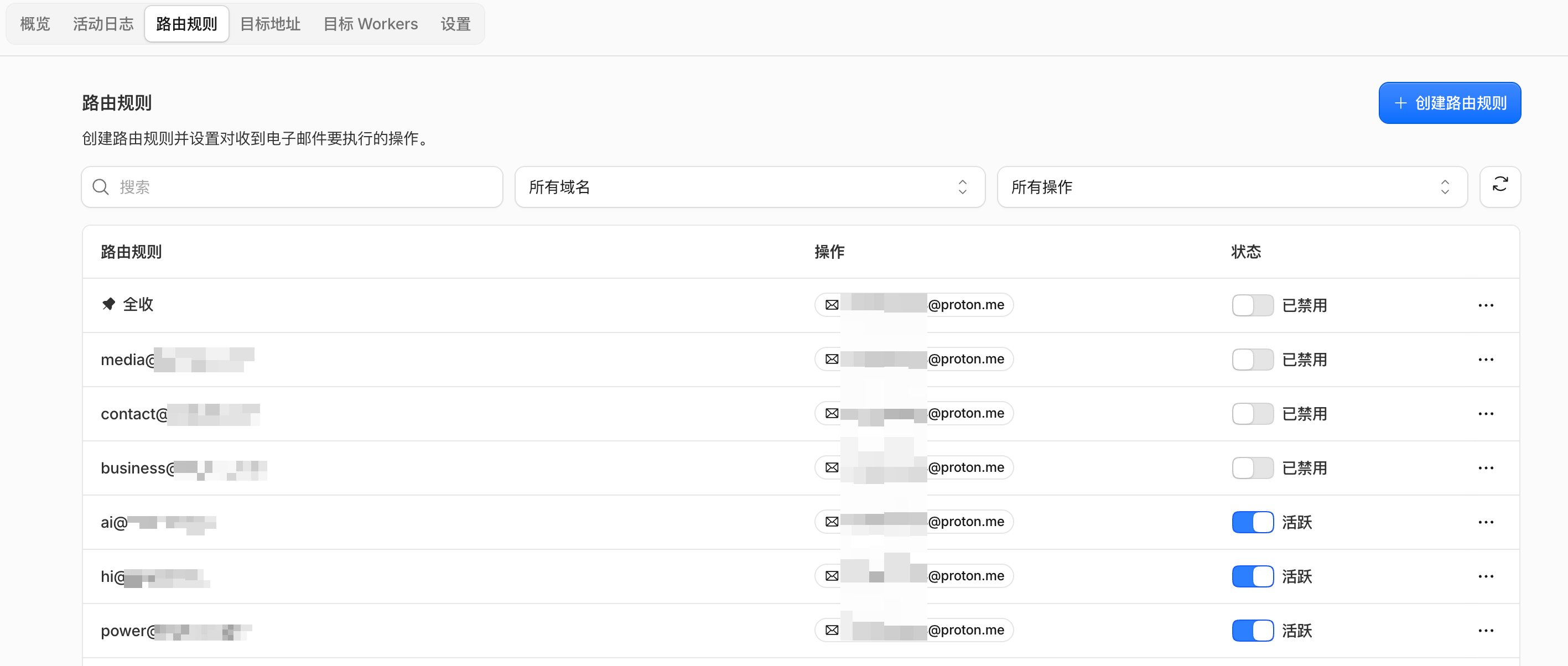
For example, use nf@ for Netflix, tb@ for Taobao, th@ for Thai accounts — give each service its own dedicated address, and setting one up takes just seconds.
It's a bit like someone registering on Taobao as "Li Taobao" or opening a bank account at CCB as "Chen Jianhang" — the address itself tells you what it's for, and if it leaks, you can trace where it came from.
It also neatly solves Apple ID management. Thailand, Malaysia, Taiwan, and the US each get their own email, different personas, but all landing in the same inbox.
For example: tw@tutu.icu, my@tutu.icu, us@tutu.icu
Besides the cost of the domain itself, it costs nothing.
How it works
In one sentence: Cloudflare acts as your doorman — it receives emails and forwards them to you, but doesn't store them for you.
You buy a domain, hand its DNS to Cloudflare, then flip on the "Email Routing" switch. From then on, any email sent to "anything@yourdomain.com" gets forwarded to your real mailbox — Gmail, iCloud, Proton, whatever you use daily. No servers to buy, no monthly fees.
If you don't have a Cloudflare account, register one first: https://dash.cloudflare.com/sign-up
Four steps
1. Buy a short domain
I'm using tutu.icu for this demo, but that's not actually what I use in production. Some very short domains like uk, jp, cc, ai, io, me may actually be better than .com, and .ai domains are getting more expensive by the day. When picking a domain, also check the renewal price for year two — it's very common for obscure TLDs to be dirt cheap the first year and then double on renewal.
Cloudflare sells domains itself. It might be slightly pricier than other registrars, but it's convenient. Purchase page: https://dash.cloudflare.com/?to=/:account/domains/register
For example, say you want the name hitutu. Search on Cloudflare and the prices for different TLDs look like this (USD/year, August 2026):
| Domain | Registration | Renewal |
|---|---|---|
| hitutu.cc | 8.00 | 8.00 |
| hitutu.org | 8.50 | 11.20 |
| hitutu.com | 10.46 | 10.46 |
| hitutu.net | 11.86 | 11.86 |
| hitutu.dev | 12.20 | 12.20 |
| hitutu.xyz | 12.30 | 11.20 |
| hitutu.app | 14.20 | 14.20 |
| hitutu.co | 15.00 | 30.00 |
| hitutu.icu | 15.20 | 15.20 |
| hitutu.me | 16.56 | 16.56 |
| hitutu.io | 50.00 | 50.00 |
| hitutu.ai | 80.00 | 80.00 |
If you want that AI flex, .ai will set you back eighty bucks — that's steep, so weigh it yourself. Also watch out for things like .co: fifteen to register, thirty to renew.
You don't have to buy from Cloudflare either. GoDaddy, Spaceship, Namecheap, Porkbun, Dynadot, Name.com all work. As long as you point the DNS to Cloudflare afterward. But overall, buying through Cloudflare is the most hassle-free and convenient.
2. Hand the domain to Cloudflare
If you bought it through Cloudflare, skip this step. If you bought it elsewhere, add your domain to Cloudflare first, then go to your registrar's dashboard and change the "nameservers" to the two addresses Cloudflare gives you, then wait for it to propagate. If you get stuck here, just ask an AI.
Note: Cloudflare must be the full authority over your domain's DNS. If you only proxy your website traffic through it while keeping DNS elsewhere, this feature won't work.
3. Bind a real mailbox
Go into the Email Routing dashboard and add an email you check daily as your "destination address" — e.g., your Gmail or Protonmail. All mail will eventually land in that inbox.
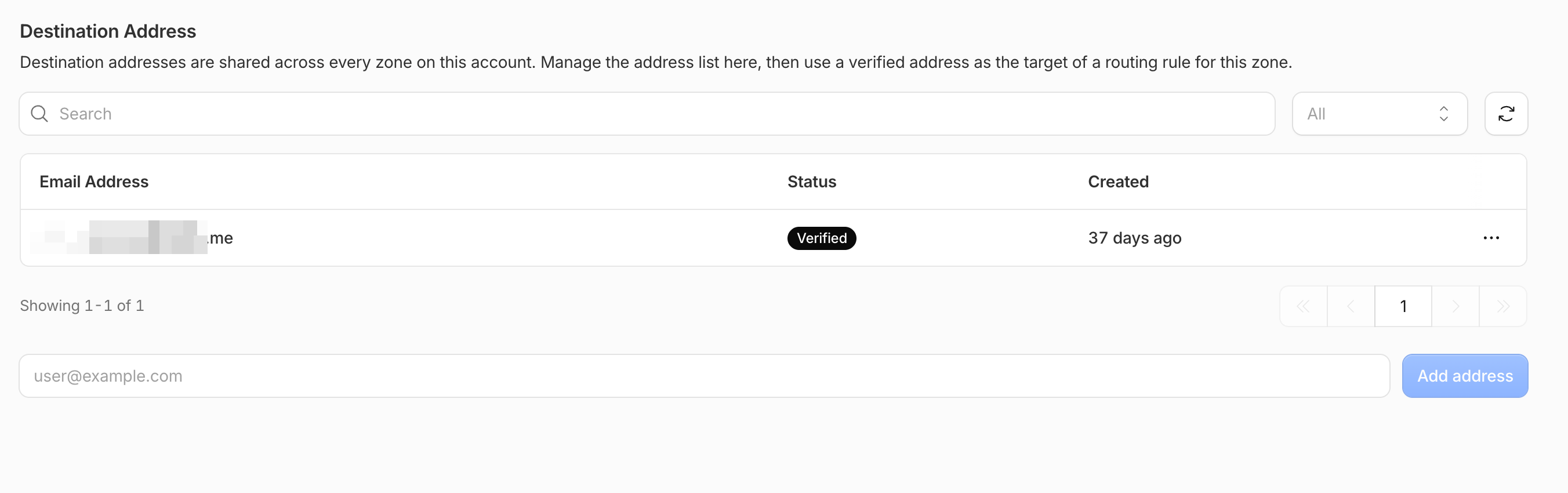
The process is just a verification code: after entering the address, Gmail receives a verification email from Cloudflare, you click the confirm link, and that's it. Cloudflare will then prompt you to add a few DNS records — one click and they're written.
4. Start making addresses
Go to "Routing rules" and create a new one: on the left, enter the prefix ai and select your domain; on the right, select the mailbox you just verified; save. ai@tutu.icu is now live. Want th@, us@, hi@? Repeat the step — a few seconds per address.

One rule at a time, or catch-all
You need to understand the difference between these two modes first, because it determines whether you get buried in spam.
Per-rule setup means one rule per address you create. Prefixes you haven't created — like abc@ — get bounced if someone sends there; that address effectively doesn't exist in the world. Clean and controllable, at the cost of clicking through the dashboard twice every time you want a new address.
Catch-all is a single switch that accepts mail sent to any prefix at your domain, including ones you've never created. You can make up a prefix on the spot and it works. The "unlimited creation" I mentioned in the tweet refers to this. Per-rule has limits:
| Item | Limit |
|---|---|
| Max rules per domain | 200 |
| Max destination addresses per account | 200 |
| Max message size | 25MB |
But I'd suggest not turning on catch-all right away. On the day I enabled it, I received a résumé sent to an address I had never created. Most likely an automated script scanning domains for common prefixes like hr@, jobs@, info@, employment@ and blasting them.
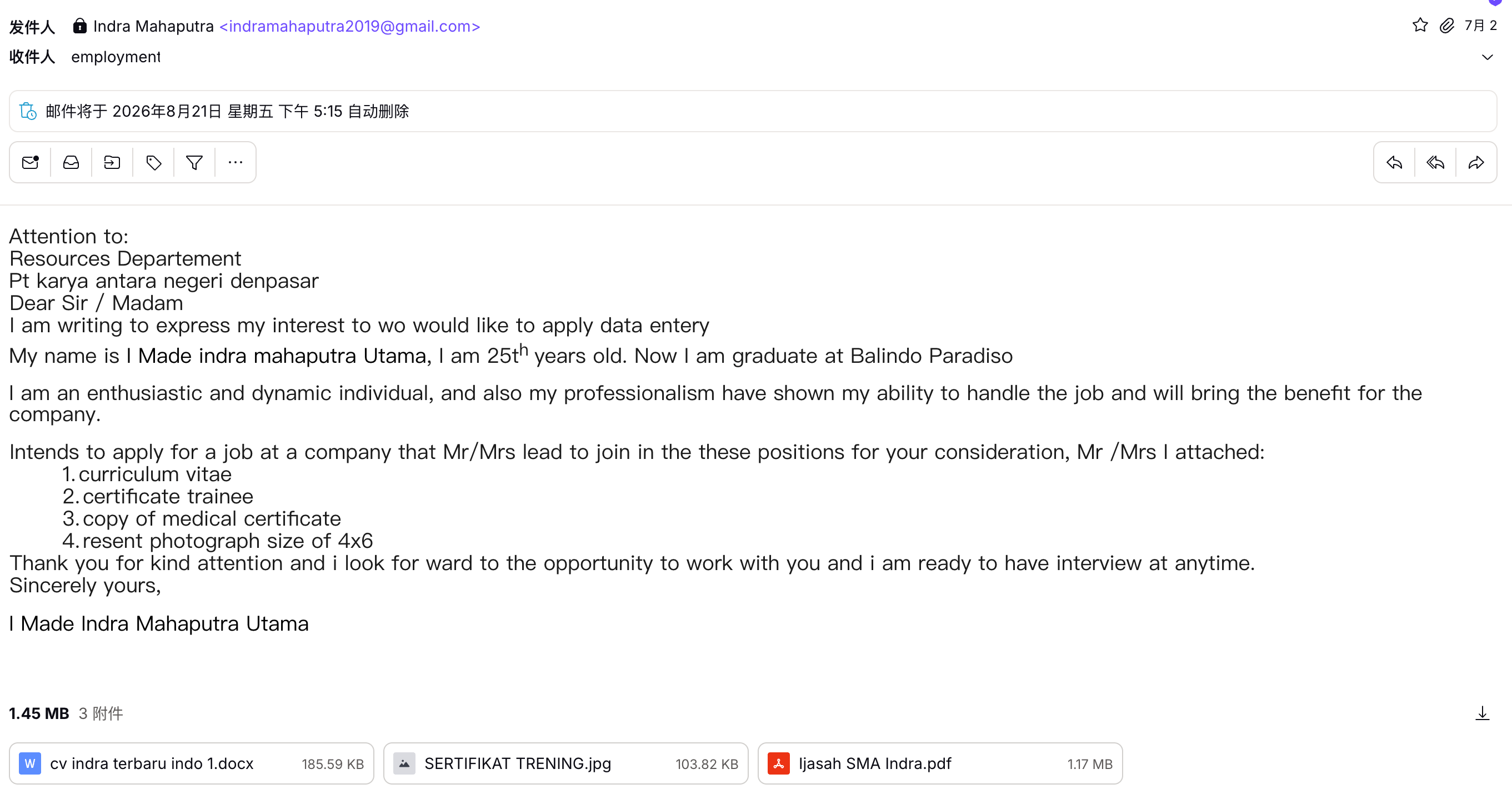
The safer sequence is to start with per-rule setup — 200 rules is plenty for personal use for a long time — and only flip on catch-all if you ever get tired of adding rules. If you do enable it and get harassed, create a rule for that specific prefix with the action set to "Drop" so it never even reaches your inbox.
Three gotchas to know beforehand
1. Cheap TLDs may get rejected by platforms
TLDs like .icu, .xyz, and .top are so cheap that spammers have burned them. The result is some platforms flat-out refuse to accept such emails for registration, or they accept the registration but you never receive the verification code — the other side's servers block the entire TLD as spam.
So tier it: Apple ID, banking, and government accounts should use a normal domain; the extra tens of dollars buy you zero headaches. Save cheap TLDs for subscriptions, trials, and coupon sign-ups where you don't care.
2. Receive-only, no sending
This is the most important caveat of the whole setup, so think it through before you commit. The official docs state it clearly: sending or replying from your domain is not supported.
It's fundamentally a forwarder, not a mailbox. ai@tutu.icu can receive mail from anywhere in the world, but it can't send a single message. If you hit "reply" in Gmail to a forwarded email, the recipient sees your xxx@gmail.com as the sender, not ai@tutu.icu — not only do you fail to look cool, your real address is exposed.
For registering accounts and receiving verification codes, this limitation doesn't matter. If you want it as an outward-facing address, you'll need to add a sending layer: the easiest is Gmail's "Send mail as" feature paired with a third-party sending service (Resend, Brevo, and SendGrid all have free tiers). Once configured, you can select ai@tutu.icu as the sender when composing in Gmail. Cloudflare itself now supports sending too, but it requires writing code. The most carefree approach, though, is to treat it purely as a "receiving mailbox" and register a separate address for outward communication.
There's also the fully self-hosted route. Cloudflare has open-sourced agentic-inbox, a mail client that runs entirely on their own cloud — sending and receiving both happen inside, attachments are stored, and it even includes an AI assistant that can read mail, search, and draft replies for you (drafts only go out after you approve them). There's a one-click deploy button, open source and free. I haven't tried this myself, but it sounds quite slick.
This route was pointed out by @lexrus in the replies to my tweet. Feel free to give it a shot.
For now, I keep things separate: Cloudflare for sign-up purposes, proper email services for my outward identity. I personally use Gmail, iCloud, and Protonmail.
One more thing I learned the hard way: if you don't care about customizing your domain, Apple already has this built in. iCloud+'s "Hide My Email" can generate a bunch of random addresses that forward to your primary inbox, and crucially, you can reply directly from them — unlike Cloudflare, which is receive-only. Addresses generated when signing up for third-party apps via "Sign in with Apple" are free; manually creating them requires an iCloud+ subscription, and the cheapest tier is only a few dollars a month. Setup instructions are in the official docs: Set up and use Hide My Email in iCloud+ on all your devices
The trade-off is that addresses are randomly generated — meaningless strings with zero style. If you want customization, go the domain route; if you want convenience, use Apple's.

3. Lose the domain, lose everything
This one has no technical complexity, but the consequences are the most severe. If you forget to renew the domain, or the registrar suspends it, every account tied to it stops receiving verification codes. Apple ID is especially dangerous: you register a US account with us@tutu.icu, buy a bunch of apps and subscriptions, then two years later the domain expires and someone else grabs it — and that person can receive your Apple ID reset emails.
The fix is simple: renew 5 to 10 years at once instead of year by year; enable auto-renewal and confirm the card on file won't expire first; add a phone number to important accounts, enable two-factor authentication, and store recovery keys so your email isn't the only key. And protect your registrar account itself — that's the top of the chain.
One clarification while I'm at it: switching Apple regions depends on your payment method and billing address, not your email. The email just saves you from juggling a pile of different Gmail addresses. To actually register an account in a given region, you still need a payment method from that region. This policy keeps changing, so verify it yourself before you start.
A few small details
Prefixes can't be in Chinese — tutu@tutu.icu doesn't work; what goes before @ must be English. In rare cases, forwarding will fail — this is a common flaw in all forwarding solutions, and it fails without notifying the sender; they think it went through while you never received it. The good news is the dashboard keeps logs, so you can check whether something arrived and whether it was forwarded.
Comparing the CF approach
| Solution | Cost | Can send | Custom domain | Best for |
|---|---|---|---|---|
| Cloudflare Email Routing | Domain cost only | ❌ | ✅ | Low-cost custom domain |
| iCloud Hide My Email | iCloud+ required | Can reply | Requires iCloud+ | All-Apple households |
| SimpleLogin / Addy | Free tier exists | ✅ | On paid plan | Privacy-first |
| Proton / Fastmail | Monthly fee | ✅ | ✅ | Primary mailbox |
If you just want to avoid exposing your real email when signing up for services and want a domain short enough to rattle off, Cloudflare's approach is hard to beat on value — the annual cost is a single domain registration. If you need an address that can send outward and stand as a long-term identity, then pay for a proper service.
A word on Cloudflare
This is one of the few companies in recent years that's still willing to give away genuinely good stuff. DNS hosting, CDN acceleration, DDoS protection, site deployment, WARP — all free, including the Email Routing this post covers, and there's no "free plan gives you only 3" nonsense.
Their recent moves have been aggressive too: on August 4 they launched Wallets, giving AI agents wallets and identities with spending caps so you can let them buy services on their own; on August 6 they released Kitesurf, a browser built specifically for AI with a fraction of the memory footprint of traditional options; and they recently open-sourced cloudflare/computer, described in one line as "a computer for your AI." Read together, it's clear they're building an entire application layer for AI — something big is coming.
A company that started with CDN acceleration getting to where they are today isn't about marketing — it really is the service. Plenty of people call them the "cyber philanthropists." It's also why I'm willing to trust them with my domains, DNS, and email.
Finally
A short domain is like handing yourself an entire business card set: give out hi@ publicly, use nf@, tb@, th@ for sign-ups — it just feels right. And you can make up a prefix on the spot, delete it when something goes wrong, no regrets.
Classy, fun, and disposable anytime.