Equip Your MacBook with Offline Translation via Ollama and a Small Model, Keeping Data On-Device
I've been using this setup for a while now, and only wrote about it once it proved stable.
First, my machine: a MacBook Pro 16-inch, bought two or three years ago, M3 Max, 64GB RAM. I got it specifically for video editing, so it has plenty of performance headroom.
I never ran models on it. Subconsciously, I always thought running models was a separate thing — that you'd need a dedicated high-performance box tucked in a corner to call it "local deployment."
Then it hit me: when the video-editing machine is idle, running a small few-GB model is just a casual side task.
The benefits are straightforward: fast, private, stable.
The two translation tools I use day to day
For translation, I mainly rely on two tools — one inside the browser, one outside. Two separate setups.
In the browser, I use Immersive Translate (https://immersivetranslate.com). It's genuinely strong at the web level — nearly omnipotent in Chrome: bilingual web pages, video subtitles, image translation, input translation, PDF translation, SRT subtitle files, select-to-translate, AI Reply. Almost every scenario you can think of is covered.
The cost isn't cheap though; pricing is here: https://immersivetranslate.com/zh-Hans/pricing
Input translation — type in Chinese, hit the shortcut three times, and it's replaced in place with English. Great for replying to messages and emails.
It's not perfect, though. At the end of the day, it's a browser extension. The OCR and select-to-translate experiences are mediocre and not fast enough. Once you leave Chrome, it's basically useless — it can't reach into apps or PDF readers.

So outside the browser, I use Bob (https://bobtranslate.com). A dedicated macOS translation tool that turns translation into a system-level capability.
Select-to-translate: in any app, highlight text, and with the Popclip plugin, you don't need to switch windows or copy-paste.
Screenshot OCR translation is its strongest feature. Text in images, subtitles in video frames, PDFs that won't let you copy — just frame it and translate. Its recognition accuracy beats every other tool I've used.
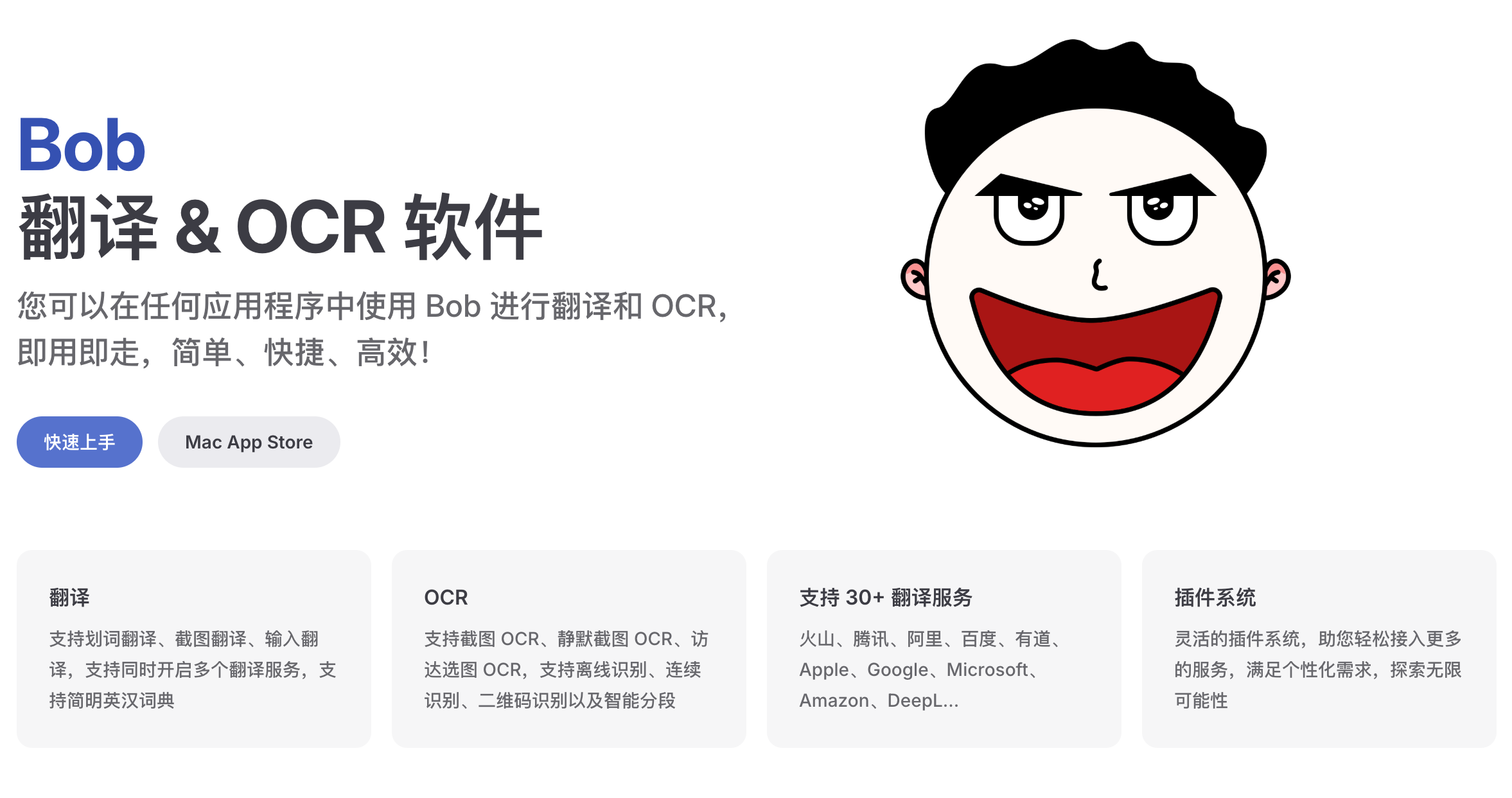
The key thing about Bob: it's just a shell — you can swap the translation engine freely. Built-in online services, your own APIs, locally running models — all can be hooked up, and multiple services can run side-by-side for comparison.
And that's the core point of this article — since the engine is swappable, can we swap in one that runs entirely on your own computer?
After translating for a while, privacy kept nagging at me
Both tools work well, but there's one issue I grew increasingly uneasy about: where does what I translate actually go?
Immersive Translate supports many models, and it looks like freedom of choice — but they all share one thing: they're all cloud-based. No matter which you pick, your text has to leave your machine first.
Bob is slightly better — its default "System Translation" uses macOS's built-in local engine, no internet needed. But the moment you hook up Google, DeepL, Zhipu, Youdao, or Qwen, your content gets sent out. It's just a matter of who receives it.
Translating technical docs or news casually? No big deal.
But I also translate bank statements, ID documents, visa materials, rental contracts. That's stuff I genuinely don't want to toss into a cloud API — even if they explicitly state they don't retain it.
So I asked AI: is there a way to translate without it ever leaving this computer?
It told me both Immersive Translate and Bob support connecting to Ollama — meaning I can run a translation model on my Mac and have both tools call it.
Why I chose this lightweight translation model
Everything I translate is everyday content: web pages, emails, subtitles, manuals, bills. Not academic papers, not professional material that requires deep background understanding — and always short, from a sentence to a couple of paragraphs.
So my requirements for output quality are modest — basically accurate and unambiguous. I don't need it to weigh every word; I need it to not misinterpret. Better than macOS's built-in translation, reaching Google Translate's level is sufficient.
What really matters to me is speed. This setup's benchmark targets are Google and DeepL. If local output is slower than cloud, that ruins the experience. No matter how large or clever the model, if I'm waiting seven or eight seconds, I probably won't use it next time.
Select-to-translate is a one-tap action — even one second of lag is agony.
In the end, AI suggested I use huihui_ai/hunyuan-mt-abliterated:7b, built on Tencent's Hunyuan-MT-7B. It's not a general-purpose model that "happens to translate" — it's trained specifically for translation. Apparently, at 7B scale, it outperforms plenty of general models several times its size at this one task.
General large models also share a flaw: they're chatty. Ask them to translate a sentence, and they respond with "Sure, here's the translation: ... (Note: can also be translated as ...)" — or they output CoT reasoning chains that you have to manually disable. Hooked into a select-to-translate tool, all of that is noise.
It's like a street-side key-cutting stall — the guy doesn't ask a word, thirty seconds later you're done and gone; versus a department store service desk that first walks you through all the key types and what to watch out for.
A translation-specialized model does one thing: source text in, translation out, not a single extra word.
What "abliterated" means, and why translation needs it
The "huihui_ai" in the model name is a community creator. "Abliterated" means "de-censored version."
Why use this for translation? Because the original version refuses to work on certain content.
For example, subtitles for TV shows with profanity — the original translates everything into polite, decorous language; every f-word becomes "darn."
News reports involving violence or crime details — regular models may refuse outright or skip key paragraphs.
Forum posts on gray-area topics — either refuse to translate or tack on a "friendly reminder."
And a subtler category: political topics. This model comes from Tencent, so its boundaries are about what you'd expect. When translating foreign media, if it hits certain year-date combinations or certain names, it suddenly plays dead — either skipping whole paragraphs or giving you a roundabout hedge.
The worst part is that this distortion can be silent.
Testing is simple — download both the original and the abliterated version, feed the same source text to both, and compare the differences.
My take: a translation tool's duty is to faithfully reproduce the source, not to censor what I choose to read on my behalf. A translator shouldn't be covering your eyes while translating.
Three steps to install — step one you can hand to AI
Step one: installing the model — delegate to Claude Code
I handed this entire step to Claude Code. All you need to remember is one thing — the model name:
huihui_ai/hunyuan-mt-abliterated:7b
Give it that name, and have it install Ollama, pull the model, and keep it resident in memory. If installation fails or errors occur, hand those back to it too — it'll troubleshoot itself.
Here are the commands, not for you to type, but so you know what it's doing on your behalf:
bash
ollama pull huihui_ai/hunyuan-mt-abliterated:7b
launchctl setenv OLLAMA_KEEP_ALIVE -1
launchctl setenv OLLAMA_ORIGINS "*"
The first line pulls the model — 4.6GB, done in the time it takes to get a drink. The second keeps the model resident in memory. Ollama's default is to unload the model after 5 minutes of inactivity, meaning the next translation has to reload it — that's one reason many people think "local models are slow." Set it to permanent, then run ollama ps — the UNTIL column should show Forever. It uses 5GB of RAM, which is completely manageable. The third line allows browser extensions to access the local service.
The next two steps you'll do yourself, because they're UI clicks inside two apps — AI can't do those for you.
Step two: connecting it to Immersive Translate
Immersive Translate has supported Ollama natively since version 1.15.1 — no need to fiddle with custom endpoints.
Go into the plugin settings → Translation Service, find Ollama, enter the model as huihui_ai/hunyuan-mt-abliterated:7b, leave the API address at default, and fill in anything for the API key.
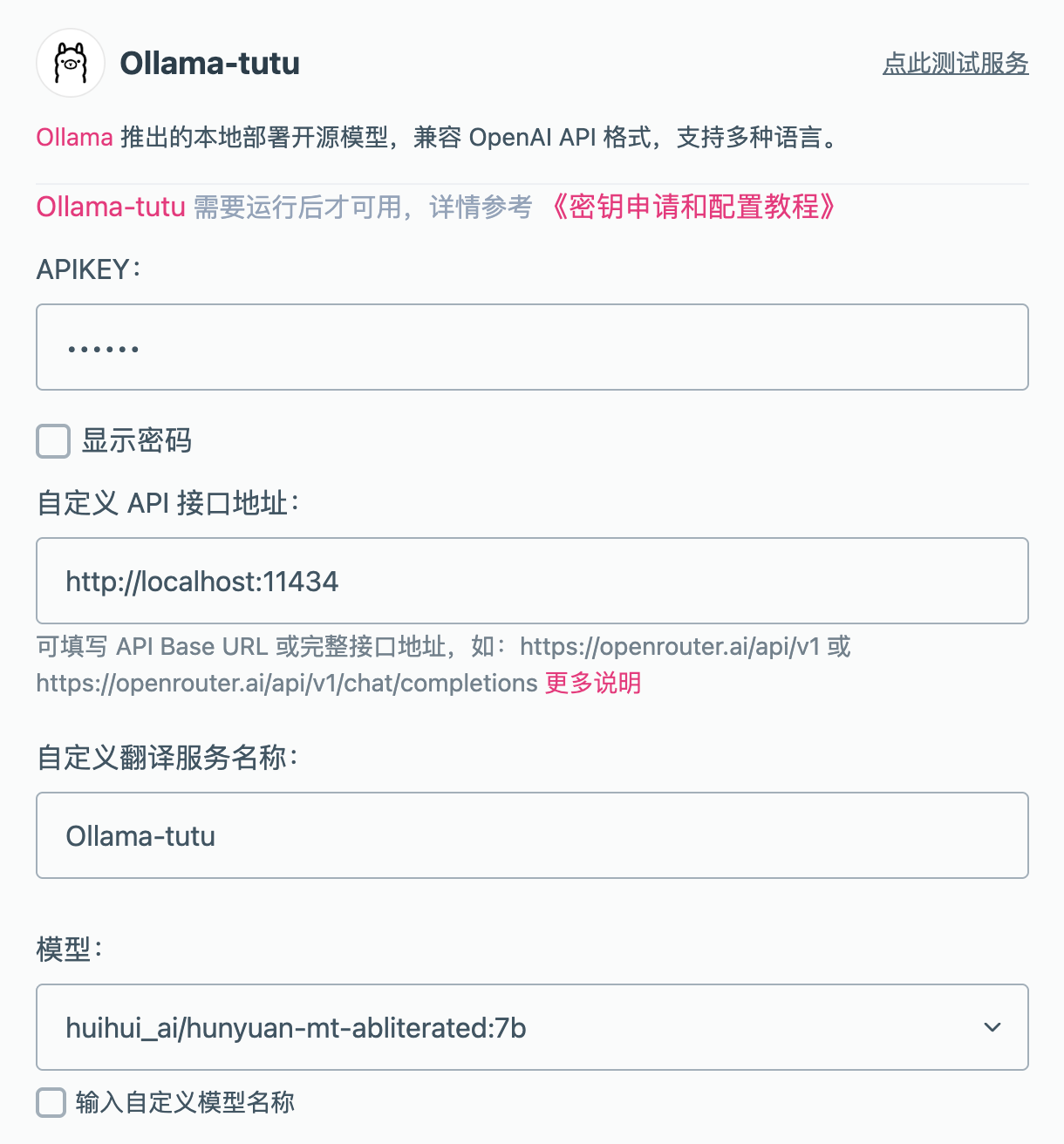
But to be honest, this model's experience with Immersive Translate is mediocre.
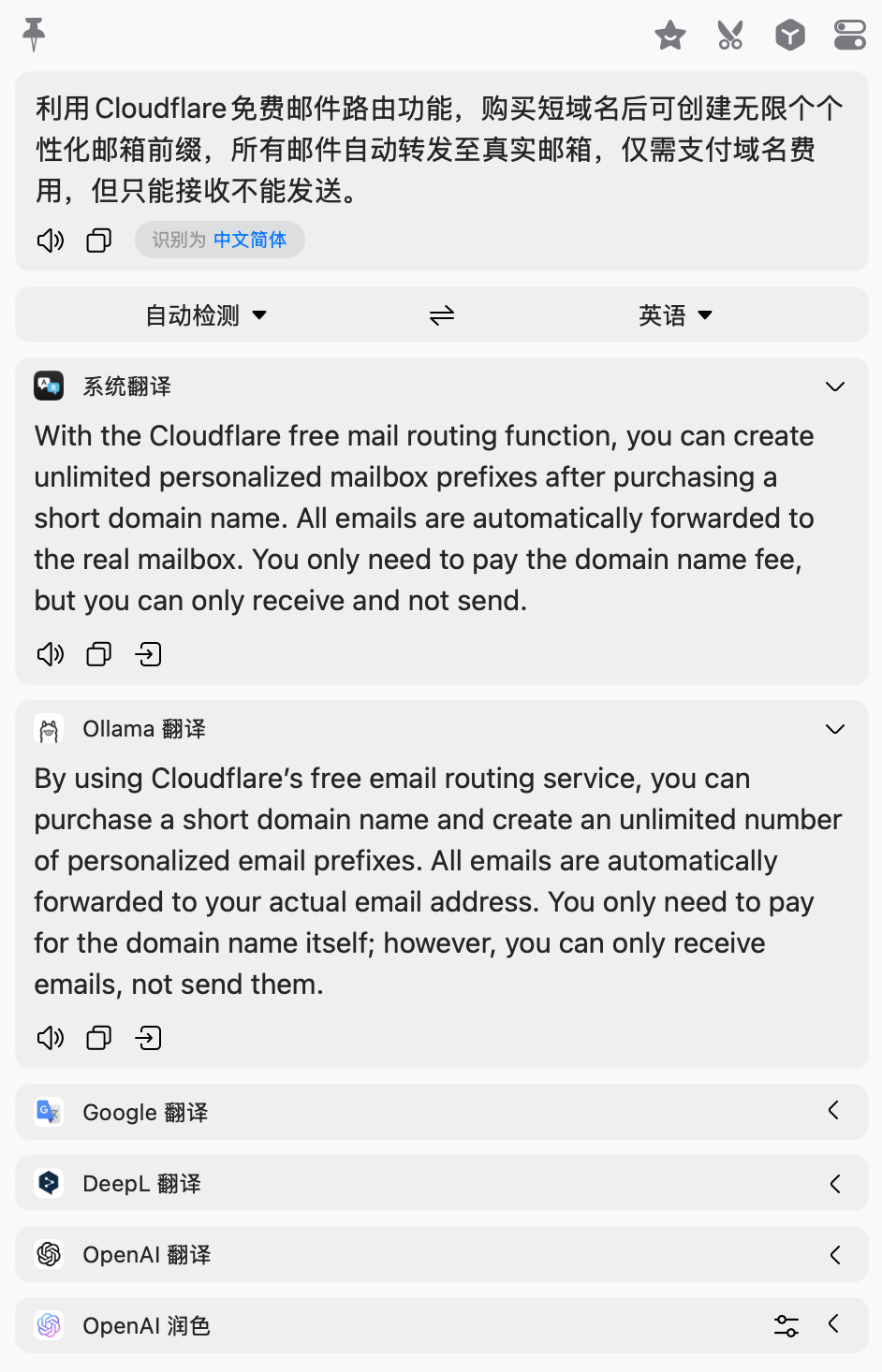
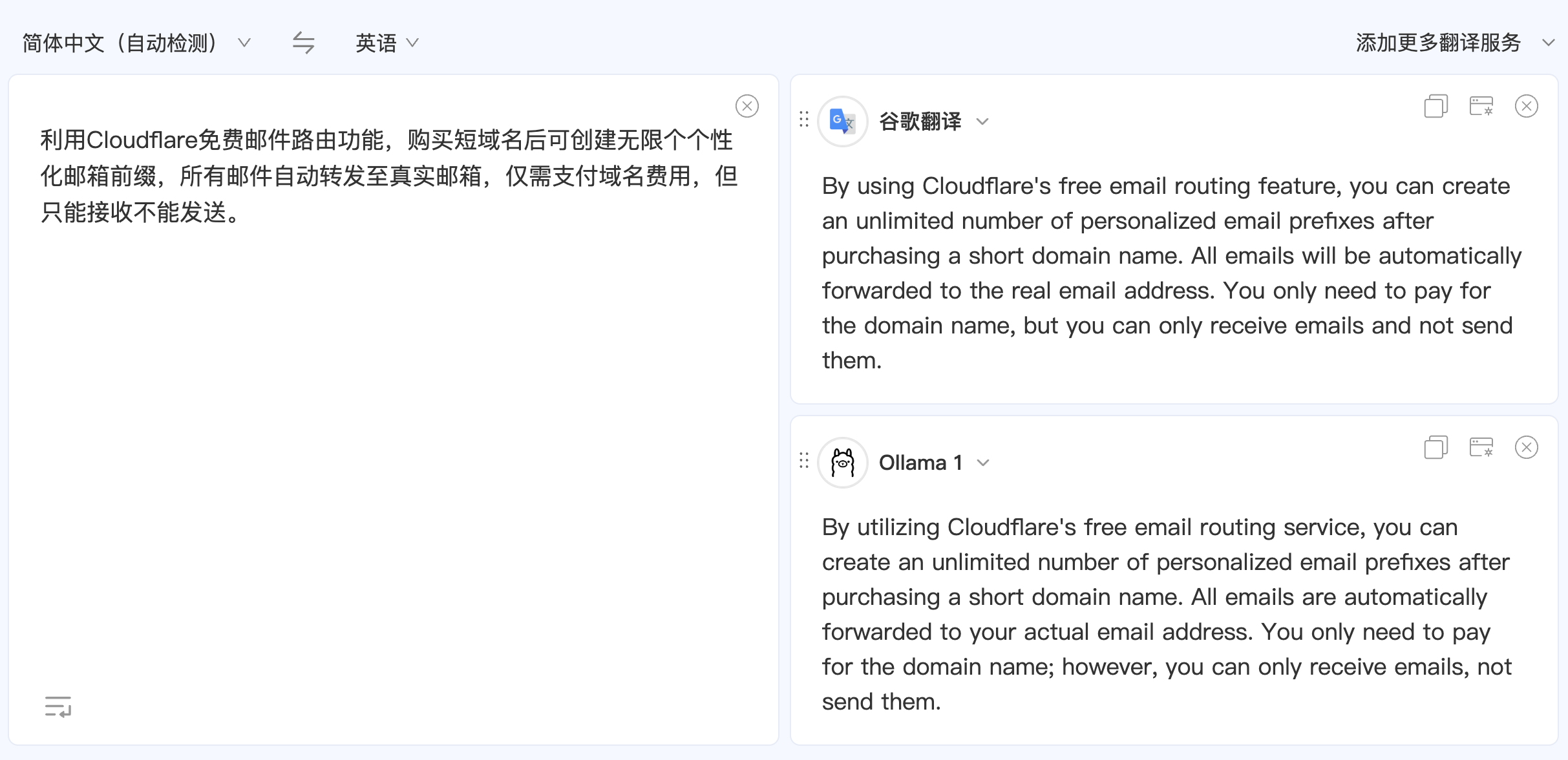
Full-page translation and select-to-translate are completely different workloads. You open a webpage, and tens or hundreds of paragraphs get batch-sent, all over multithreading — a 7B local model can't handle that volume. The fans spin up, translations trickle out paragraph by paragraph, slower than cloud. (Translation result below)
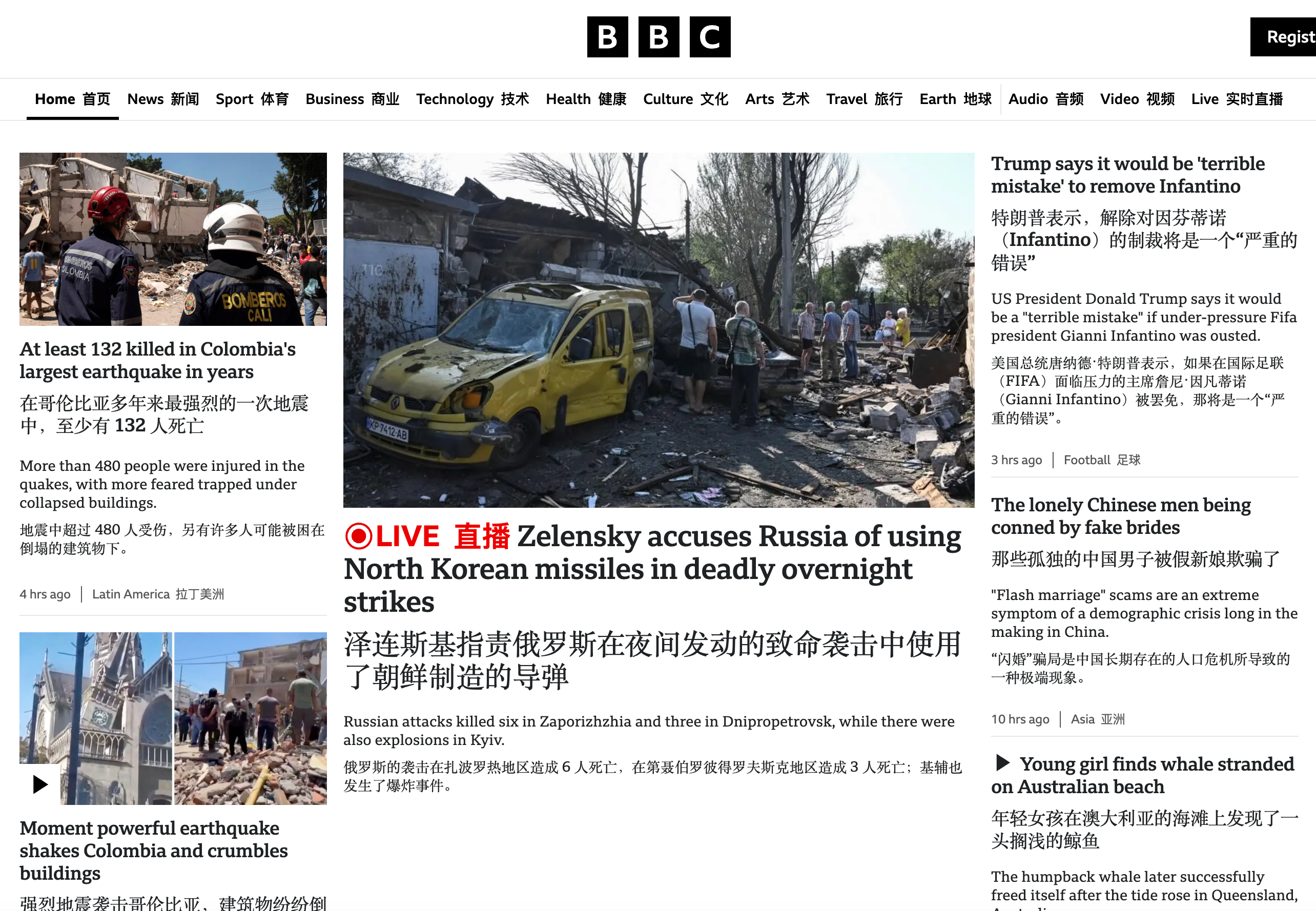
So I split usage myself: full-page translation still goes through the cloud; the local model is reserved for Bob — copying a passage, selecting a subtitle, framing an image. For these fragmented small jobs, it's fastest.
Fortunately, the privacy requirements differ anyway. What you full-page translate is mostly public web content — nothing leak-worthy. The bills, contracts, and documents you truly don't want cloud-translated are exactly the select-and-frame fragmented scenarios, which local handles perfectly.
In short: local models excel at short, quick tasks — not endurance work.
Step three: connecting it to Bob
Bob → Settings → "Services" → Add Ollama translation service. Then set the custom API Base URL to: http://localhost:11434 (Ollama's default local port), and the custom model to: huihui_ai/hunyuan-mt-abliterated:7b. For the token count, I followed AI's suggestion of 4096.
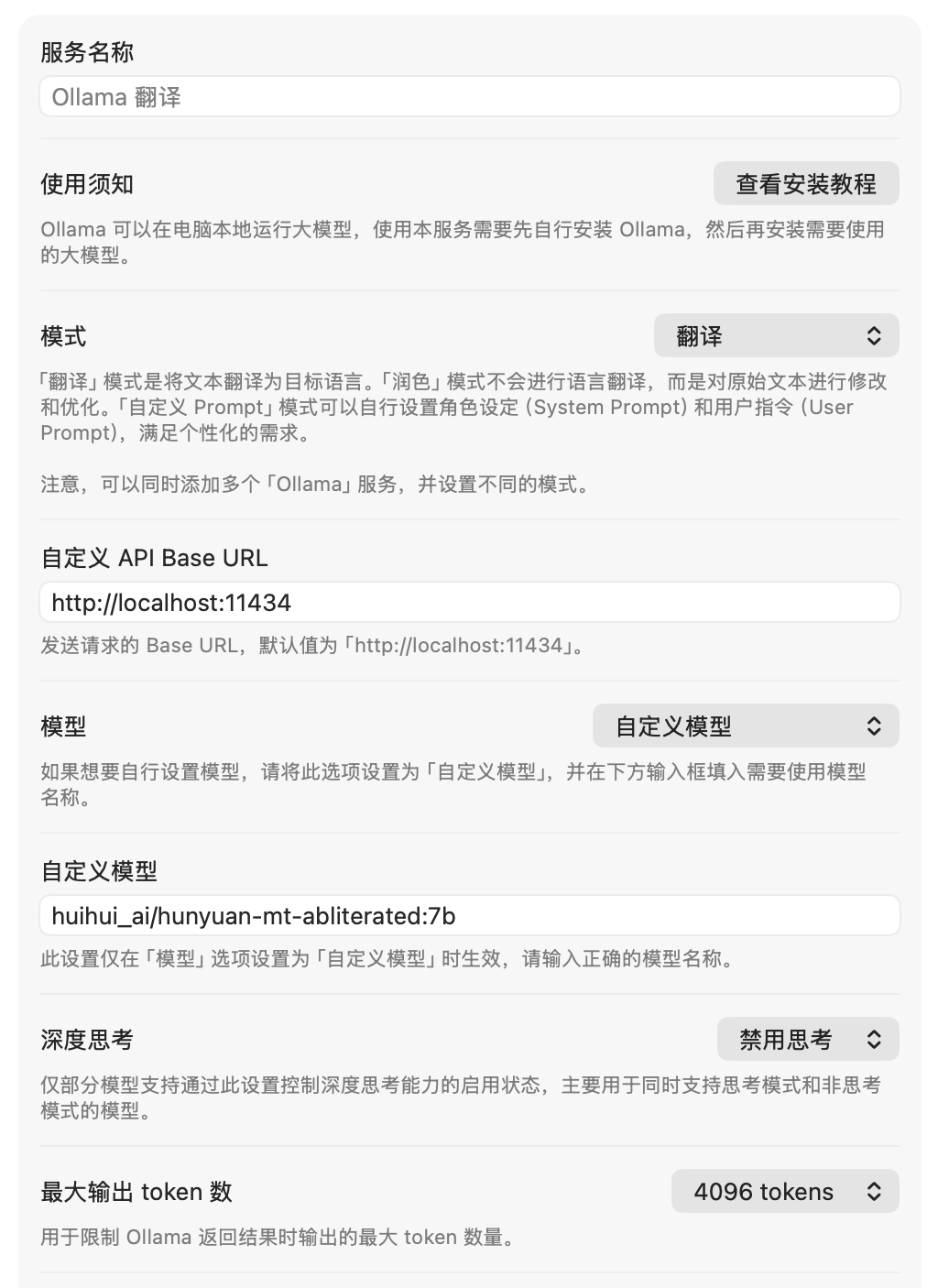
Then test whether it actually translates: (Immersive Translate + Bob results)
Three gotchas to know in advance
One: after a Mac restart, the resident setting is gone
Those launchctl commands only apply to the current boot session. They silently reset after reboot — with zero warning. You'll only notice one day that "translations feel slow again." Fix: after restarting, run ollama ps — if UNTIL isn't Forever, have AI set it again. Or, if you're tired of it, just have it write a launchd startup config and be done forever.
Two: Ollama defaults to 4096 context tokens, silently truncating long text
The model itself supports up to 256K, but Ollama defaults to a 4096-token window to save memory. Select-to-translate for a sentence or two is plenty. But if you dump in whole paragraphs or pages, anything beyond the limit gets cut off — without any error. The translated output looks complete, but the second half never made it in. Fix: increase the window, say to 32768. The tradeoff is higher memory usage. Judge for yourself — enough is enough.
Three: the abliterated version is a community mod, not the official Tencent release
This doesn't affect usage, but you should know what you're running. Abliteration is essentially "surgery" on the model, and the author describes it bluntly in their notes: this is a rough proof-of-concept implementation, recommended for research and testing environments, not for production or commercial-facing scenarios.
Surgery has its costs — removing refusal ability may cause subtle degradation elsewhere in the model.
The 7B is five times faster than the 27B, with no quality loss
I also have gemma3-abliterated:27b-q8_0 sitting in my Ollama — a hefty 29GB beast. Why not use it for translation? The same English financial news sentence, real measured data:
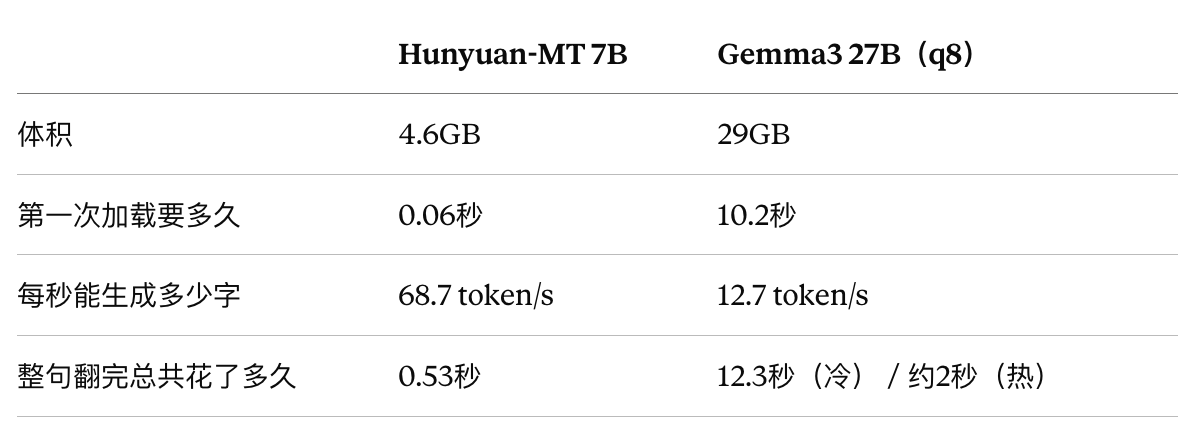
The conclusion is straightforward.
Speed is five times faster, and the 10-second cold start is a dealbreaker on its own. Quality is not inferior — translation is Hunyuan-MT's native job. Comparing daily English–Chinese back-and-forth, the 7B specialized model's output rivals the 27B general model, sometimes even cleaner — the 27B occasionally adds explanations or rephrases, while the specialized model never acts on its own initiative. Resources also differ hugely: 5GB resident is imperceptible; 29GB resident will fight for memory when you're running subtitle rendering during video editing.
General models like Gemma3 aren't bad — they excel at writing, reasoning, and summarization. But that's a different workstation's job. For high-frequency small tasks like everyday translation, a specialized small model is the optimal answer: small, fast, specialized, and affordable to keep resident.
Use the right knife for the job — a chicken knife is faster at chickens.
Privacy is the real trump card of this setup
Speed is just the pleasure part; privacy is why I switched completely.
The bank statements and visa materials I mentioned are just the beginning. The real issue is: sometimes what you translate might be your most sensitive data.
What you'd take to a translator is exactly what you can't read but must understand — contract clauses, medical reports, legal letters, business emails, unpublished drafts, private chat logs.
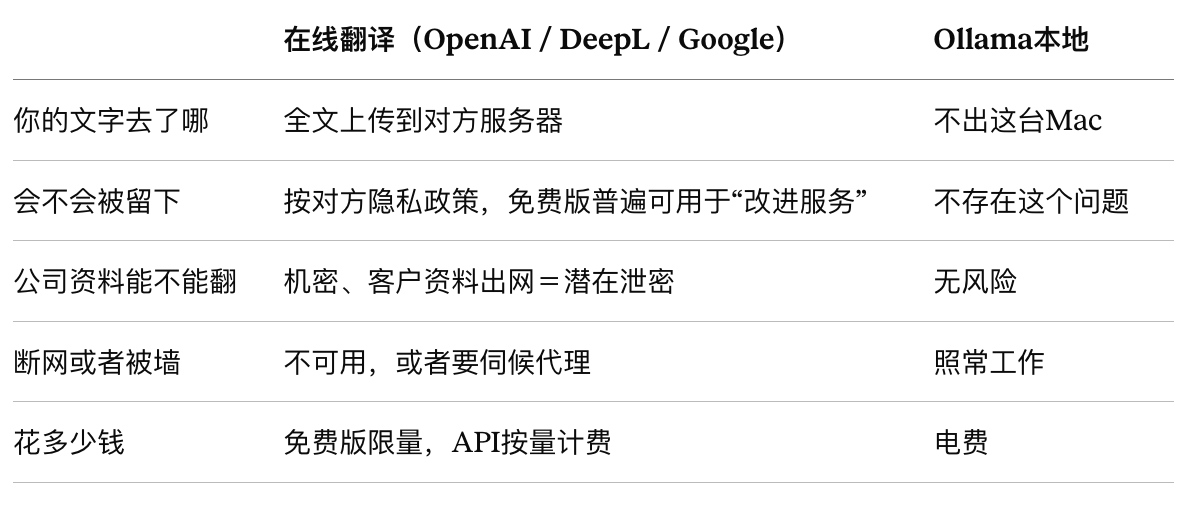
Free online translators' business model is built on your data. Why is Google Translate free? Why is DeepL's free tier free? Because what you translate becomes training corpus and product data. Paid APIs promise no training, but the whole "upload-process-delete" chain — you can only choose to trust it.
For some industries, this isn't fastidiousness — it's a red line. Lawyers translating client contracts, doctors translating medical records, companies translating unpublished financials — pasting those into a web translation box is, strictly speaking, a data breach.
A local model eliminates the problem at the root. It's not "they promise not to look" — it's that no transmission physically occurs.
If your machine is powerful, you can step up
I based my choice on 64GB RAM and instant-results preference. If your machine is stronger, or your use case differs, there are plenty of options.
TranslateGemma is Google's official translation-specialized model built on Gemma 3, supporting 55 languages, in 4B, 12B, and 27B tiers — go bigger for more accuracy.
HY-MT2 is the next generation of the Hunyuan translation model, available in 1.8B, 7B, and a 30B MoE version. The one I used in this article is actually the original generation — the same series has already gone through two iterations. I only noticed while writing this, and I plan to try the new one. The same series, HY-MT1.5, also has an abliterated version: huihui_ai/hy-mt1.5-abliterated.
Typhoon-Translate is a Thai–English specialized model, only 4B. For anyone living in Thailand, this could be essential.
Here's what AI said about Chinese models:
Tencent Hunyuan-Hunyuan-MT series is the only Chinese translation-specialized model worth betting on. You're using the first generation — upgrade directly to
maternion/hy-mt27B without changing configs; ByteDance Seed-X is also good but has no ready-made Ollama build; if you want a comparison model, addkaelri/qwen3.5-mt, which is only 2B. Among general models, Qwen3 32B is the most solid for Chinese–English, and DeepSeek is good but impractical to run locally.
An even more fun approach: install several and switch by scenario. Both Bob and Immersive Translate support multiple services at once:
Select-to-translate, subtitles, quick email glances — use the 7B for speed.
A long piece that deserves careful reading — switch to the 27B, wait a few extra seconds for accuracy.
Thai content — use the Thai-specific model.
Usage is identical — just swap the model name, and the rest is personal preference. That's also what makes local models more comfortable than cloud: with cloud, you only get what they offer; with local, install as many as you want.
Finally
I'm genuinely excited about what's coming in hardware. The ceiling for local translation, after all, is memory and compute — no matter how good the model, you still wait for it to calculate.
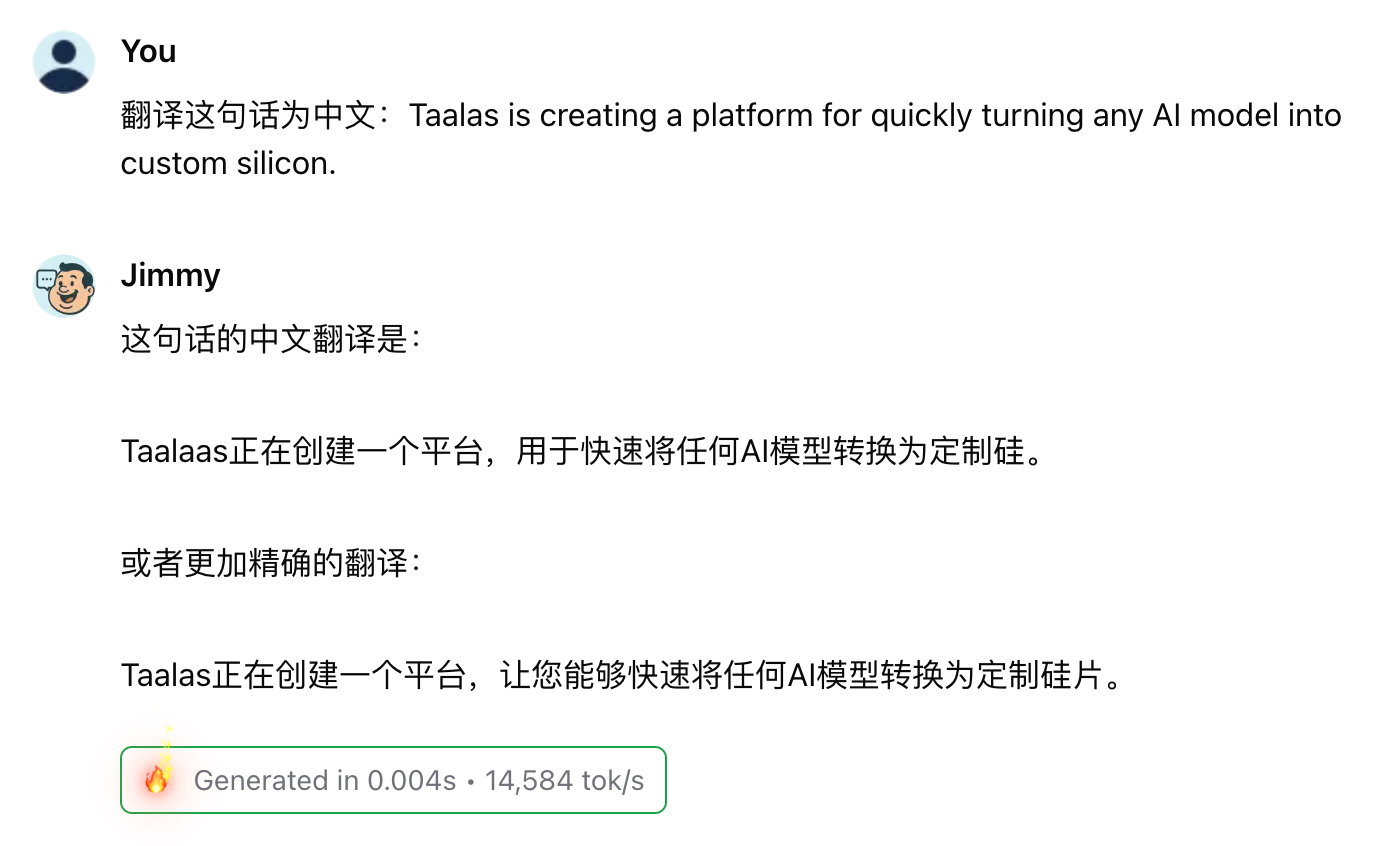
There was a Canadian company called Taalas doing something radically aggressive: not just having chips run models, but carving the model directly into silicon. Their HC1 demo card runs Llama 3.1 8B at 17,000 tokens per second — my M3 Max runs the 7B at 68.7, a difference of over two hundredfold.
They released a chat demo you can try directly: https://chatjimmy.ai/ — I tested translation on it, and the speed is terrifyingly fast. Absolutely cool.
On August 6, AMD announced the acquisition of this company.
Translation is precisely the kind of task best suited for being carved into silicon: small, fixed, high-frequency, no need for daily updates. If this path works out, maybe one day a palm-sized module could deliver local, instantaneous, unlimited translation — where even the act of "waiting" ceases to exist. And then putting such a chip inside AirPods as a translation device — I can barely imagine it.